
Major Security Flaw Discovered In Intel Processors

There’s some bad news if you own a computer driven by an Intel processor. Recently, a dangerous, catastrophic security flaw has been discovered in Intel’s X86-64 architecture that allows hackers to access the kernel, which sits at the heart of your OS. By accessing the kernel, a hacker can gain access to virtually everything on the targeted machine.

This is accomplished by way of a little-known feature called “speculative execution” which allows the processor to perform operations before it’s received definitive instructions that they need to be done. It’s a way of milking more speed out of the system.

Unfortunately, any such system runs the risk of giving programs permission to execute that, under normal circumstances, would not get permission. For example, a hacker could exploit this time-saving trick to force a piece of malware that Windows Defender (or related programs designed to safeguard your system) would otherwise catch and keep from running.

The truly terrifying part about this newly discovered exploit is its scope and scale. Intel chips are found in the majority of PCs and laptops being sold today, and this exploit has been sitting undiscovered until now, in every chip the company has made over the last ten years.

So far, Google researchers have identified two distinct attacks that could be used to exploit the flaw, dubbed “Meltdown” and “Spectre,” both being every bit as bad as they sound, and both capable of giving a hacker complete control over a target system. Fortunately, there have been no reported instances of either being used in the wild…yet.

The company is aware of the problem, and although they are playing things close to the vest, a fix is already in the works. Unfortunately, there’s a drawback. In order to implement the fix, it’s going to require a huge restructuring. This will likely eliminate the “speculative execution” feature, which is going to notably slow systems down. Early estimates are that when the fix is rolled out, you’ll see your system’s performance degraded by between 17-23%.

If there’s a silver lining in all this, if you happen to own a machine built around an AMD processor, give yourself a pat on the back. They don’t contain the flaw.

Chrome OS To Get App Multitasking Soon

Chromebooks have brought Android apps to a much wider market, making them accessible to virtually everyone, but the Chrome OS has always lagged behind other platforms developmentally.

One of its most serious limitations where running apps was concerned centered on its inability to multitask. Basically, if the app you’re using is not “in focus” or in the window you’re currently viewing, all activity in the app ceases.

There are a few exceptions such as the Spotify app, but most apps that rely on real time data and most games will freeze when a user clicks out of the window. If you’re coming to Chromebook from almost any other platform, it can be annoying and hard to get used to.

Fortunately, you won’t have to deal with this for much longer. Google recently announced the release of Chrome OS 64, which will, among other things, allow apps to continue running in the background, even when you’re not using them in the active window.

Right now, the update is available on the company’s Beta channel, so it’s a fair bet that it will be rolled out to the general user base in the very near future. However, the company has not given a firm timeframe for that.

If you have a Chromebook, this is good news indeed as it corrects what many industry insiders have long seen as a glaring weakness of the platform.

While Chromebooks don’t get much use at the Enterprise level, they are a cost-effective computing option for students and low-income people, and it’s good to see Google spending time and resources improving them.

While the latest version offers a number of enhancements, the two biggest are the multitasking support mentioned above, and the “split view” feature which will further enhance the multitasking capabilities of the platform.

Microsoft May Remove Windows Paint From Operating System

“Paint” is one step closer to being a thing of the past.

In May of this year, Microsoft caught a surprising amount of flak when they announced that the venerable app, which had been included with the OS in every release since 1985, would be going away and replaced by a newer, sleeker version called Paint 3D.

The company had not expected any backlash on the matter and was sent scrambling when tens of thousands of people complained loudly in forums all over the internet.

The company quickly revised its position, explaining that while Paint would no longer come pre-installed on future releases of Windows, it would still be available on Microsoft’s app store. This move seemed to mollify Paint’s surprising number of fans and followers, but now, Microsoft is in the news again over the surprisingly cherished app.

In a recently released Windows 10 Insider Preview, the following message was discovered when accessing Paint: “This version of Paint will soon be replaced with Paint 3D. Classic Paint will then become available in the store.”

Note that this message was not displayed upon opening Paint itself, but rather upon clicking the “Product Alert” button at the top right corner of the app screen.

While the news is certainly no surprise, given the above, the sparse wording of the message does raise the question of whether the transition will be occurring during the next Windows 10 release. So far, the company has not offered any sort of clarification or confirmation.

In any case, we’re now one step closer to saying goodbye to Paint. While it was never a very good image editing program, it has proven to have a surprisingly deep base of support. Support or no, however, the day is soon coming when it will be a thing of the past, unless users go to the store and manually download and install it.

Nvidia Dropping Driver Support For Older Operating Systems

AMD long ago dropped support of 32-bit operating systems, and now, Nvidia is following suit. The long-anticipated move by the company will mean the end of driver support for the 32-bit builds of Windows 7, Windows 8, Windows 8.1, Windows 10, Linux and FreeBSD.

Nvidia is taking a balanced, responsible approach here. The company has pledged to continue offering 32-bit driver security updates until January 2019, but will immediately discontinue making performance updates to the drivers of older OS’s.

In some respects, it’s long overdue. Today’s application environment is incredibly resource intensive, with a growing number of applications requiring more computing horsepower than 32-bit systems can deliver, since a 32-bit OS can only support up to 4GB of RAM.

The picture gets even bleaker if you’re a gamer. Even modest games tend to require more than 4GB of RAM these days, and most top-tier titles no longer offer support for 32-bit systems. That, combined with the fact that 32-bit systems are somewhat less secure overall, it’s probably time they were put to pasture.

Given this landscape, it’s probably time to pronounce the 32-bit operating system dead. If you’ve got some legacy applications still running on an old machine, now is the time to get serious about your migration plan.

Most of the older OS’s are no longer receiving security updates, which leaves you increasingly vulnerable to a wide range of hacks. That, coupled with the increasingly sparse driver support makes it inevitable that you’ll have to migrate at some point, and it’s always better to do it on your terms than someone else’s.

If you haven’t yet worked out what to do about your old legacy systems, it’s long past time to do so. The clock has been ticking for a while now, and the ticking just got a little bit louder.

Sound Waves May Be Used In Future Hard Drive Attacks

Another week, another attack vector, and this one deserves extra points for creativity.

New research has proved the viability of using something as simple and innocuous as sound waves to disrupt the normal functioning of HDDs, which can be used to sabotage a wide range of equipment from Pcs, to CCTV systems, ATMs and more.

Researchers have toyed with, and been aware of the possibility of using sound waves to disrupt the normal functioning of an HDD for more than a decade, but the most recent research conducted by scientists from Princeton and Purdue universities have outlined exactly how such an attack could be carried out.

The attack exploits a peculiar design feature of HDDs. Because they store large amounts of data on small platters, they’re designed to shut down in the presence of excessive vibration to avoid scratching or damaging the platter, and thus, destroying information on the drive.

If a hacker can determine the optimal attack frequency against a given HDD, then he could play a sound aimed at the drive that would cause it to stop functioning. If the sound were played long enough, it would require the system to be manually restarted to get it working again.

As the researchers demonstrated, finding the optimal attack frequency is a trivial enough task, but it should be noted that this is a fairly exotic type of attack, and not likely to see widespread use.

The biggest threat one would potentially face from such an attack would be the disruption of the functioning of security cameras to create a blind spot at a facility, which could then be physically breached. But given that the tones are within the range of human hearing, anyone in the vicinity could come and investigate.

Nonetheless, it’s an intriguing bit of research with potentially damaging implications.

Weird Sounds Coming From Your Speakers? Could Be A Hacker

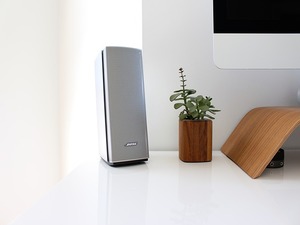
Have you been hearing strange, otherworldly sounds on your Bose or Sonos speakers? If so, rest assured that your speakers aren’t haunted. They’ve likely been hijacked by hackers.

Researchers at Trend Micro have confirmed that some models (the Sonos Play:1, the Sonos One and the Bose SoundTouch) of both brands of speakers are vulnerable to hacking if the speaker is connected to a misconfigured network.

If the hackers find such a speaker, they can take control of the speaker and direct to play any audio file hosted at a specific URL.

It should be noted that this is an extremely exotic, fairly elaborate hack, and one that’s not likely to gain the hacker much, if anything in the way of useful information about the target network. Overwhelmingly, if and where this hack is seen at all, it will be used to play pranks on the target. About the worst thing that could happen is that the hacker would play a particularly annoying or alarming sound (a woman screaming, glass breaking, a baby crying or similar), which might lead to some sleepless nights or confusion, but not much else.

Even so, it’s worth making note of, because if a hacker is able to take control of a speaker connected to your network, it means that there’s a misconfiguration somewhere that could lead to a more serious hack down the road. If it happens to you, it’s well worth reviewing your network setup and security settings.

A spokesman for Sonos had this to say about the hack: “…looking into this more, but what you are referencing is a misconfiguration of a user’s network that impacts a very small number of customers that may have exposed their device to a public network. We do not recommend this type of set-up for our customers.”

Interestingly, this isn’t the first time such a hack has been seen. In 2014, a developer created a hack that went by the name “Ghosty” that did more or less the same thing.

Vertical Video Support On YouTube For iOS Finally Here

The owners of Android devices have been able to properly view vertical videos for more than two years, but for Apple users, it was a different story.

Instead of getting the traditional full-screen experience when viewing vertical videos, Apple users were saddled with annoying vertical bars that would appear on either side of the video itself. It’s a small thing, but undeniably annoying. Now, at long last, the problem has been solved and now Apple users can enjoy the same vertical, full-screen experience as the rest of us.

YouTube announced the upgrade in a tweet that read as follows:

“Bye-bye, black bars. Now the YouTube player on iOS will automatically adapt to the shape of the video you’re viewing!”

It matters because smartphones were designed to be held in that position, so it’s the natural way to interact with the device, no matter what you’re doing with it, including watching videos.

There’s one caveat, however: A surprising number of vertical videos won’t go full screen because they’ve actually been encoded with black bars on the sides, which technically makes them landscape vids that are only mimicking the appearance of a vertical video.

Now that YouTube has made this change, over time, you’ll probably see fewer and fewer videos shot like this and uploaded. In the short to medium term, don’t be the least bit surprised if you run into videos shot like this on a regular basis.

Why it took the company so long to update the Apple version of their app with this functionality, no one knows, but it’s not hard to hazard a few guesses. In any event, it’s not something that’s likely to have a major impact on your life, but it is a welcome change and we were happy to see it.

Select HP Laptop Models Recalled Over Battery Issue

Did you purchase an HP laptop between December of 2015 and December of 2017? If so, then you may have problems.

The US Consumer Product Safety Commission has been made aware of eight instances where HP battery packs overheated, charred, or melted, creating a worrisome fire hazard that has gotten the attention of user groups scattered all over the internet.

It also got the attention of HP itself, and the company recently announced “a worldwide voluntary safety recall and replacement program” for laptops shipped during the timeframe mentioned above.

If you own one of the following models, you may be impacted:

  • HP ProBook 640 G2
  • HP ProBook 645 G2
  • HP ProBook 650 G2
  • HP ProBook 655 G2
  • HP ProBook 640 G3
  • HP ProBook 645 G3
  • HP ProBook 650 G3
  • HP ProBook 655 G3
  • HP ZBook 17 G3
  • HP ZBook Studio G3
  • HP ZBook 17 G4
  • HP x360 310 G2
  • HP Pavillion x360
  • HP ENVY m6
  • Or the HP 11 Notebook PC

You can visit HP’s website and download a tool you can use to test your laptop to see if it has one of the defective battery packs. A BIOS update is also available that will safely and completely discharge the battery. Although of course, until you get a replacement, you’ll only be able to power your laptop via the AC power supply.

According to the company, “Many of these batteries are internal to the system, which means they are not customer replaceable. HP is providing battery replacement services by an authorized technician at no cost.”

While it’s a nice gesture, it would be even better if the company hadn’t shipped the defective batteries in the first place and caused a major inconvenience to its customers. This most recent recall comes on the heels of another one less than a year ago, in which the company recalled more than 100,000 similarly defective laptops at the end of January, 2017.

Better Parental Controls Underway For Apple Devices

Recently, a group of investors wrote an open letter to Apple, urging the company to do more in regards to offering better and more robust parental controls on the devices the company makes. Although the group of investors control some $2 billion in Apple stock, this is a drop in the proverbial bucket, given the company’s $900 billion market cap. Nonetheless, the letter seems to have gotten Apple’s attention.

In a statement published in the Wall Street Journal, the company said: “We think deeply about how our products are used and the impact they have on users and the people around them. We take this responsibility very seriously, and we are committed to meeting and exceeding our customers’ expectations, especially when it comes to protecting kids.”

Previously, the company has touted the suite of parental controls it’s had in place on the devices it makes since 2008. For example, every iPhone sold has a settings app with a parental controls section that allows adults to control in-app purchases, install and delete apps, and restrict website access.

Those are all good things, but the group of investors is pushing for more. Although the company has not released any details about their planned enhancements, it does appear that the letter has prompted them to think even more deeply about the matter, and in that same letter, also requested that apple aid research that studies what impacts excessive smartphone use has on mental health.

To their credit, Apple has done more with parental controls than many, if not most other tech companies, and it is very good to see that they’re listening and responding to the concerns of their investors. This kind of responsiveness bodes well, and depending on the particulars of their plan, it could well cause other companies in the industry to attempt to match their moves.

Hard Drives May Double In Speed With New Technology

What’s an HDD manufacturer to do when faced with competition by faster, more efficient SSD drives?

Go big, and go faster. At least that’s the strategy that both Seagate and Western Digital are adopting.

SSDs tend to get prohibitively expensive as their size crosses the 1TB threshold, which creates an opportunity for HDD manufacturers. Seagate is currently selling drives with an impressive 14TB of capacity, and has plans on the drawing board to introduce a 40TB drive by 2023, with Western Digital not far behind, aiming for a 40TB drive by 2025.

That’s impressive, but as Seagate mentioned in a recent blog post:

“Capacity is only half of the solution. If the ability to rapidly access data doesn’t keep pace with all that capacity, the value potential of data is inhibited. Therefore, the advancement of digital storage requires both elements: increased capacity and increased performance.”

In order to address the performance side of the equation, Seagate is experimenting with a new approach called “multi-actuator technology.”

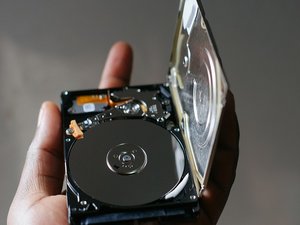
HDDS are based on platters, with an actuator arm on the top and bottom that write to the platters.

Actuators are all aligned and are designed to move in tandem, but at any given moment, only one arm is writing to the disk.

Seagate’s new solution utilizes two sets of actuator arms, each controlled independent of the other. With two heads capable of reading and writing simultaneously, HDD speeds can effectively be doubled.

It’s an idea that has been around for a while, but until recently, thanks to the prohibitive cost of the components, it was simply impractical. With component prices falling, it’s suddenly viable. The combination of massive HDDs and the new technology are making people take a second look at HDD technology.

This is a great advance that breathes new life into HDDs, and is a truly exciting innovation.